Advanced Settings
This section explains how to fine-tune Mofufuku’s behavior. If collisions are noticeable without adjustments, see below.
Debug Mode
Section titled “Debug Mode”First, as preparation, visualize how each point on the mesh was processed.
Enable “Debug Mode” and run to visualize how each point on the mesh is processed.

Click on the mesh in the scene to display the processing result at that point.
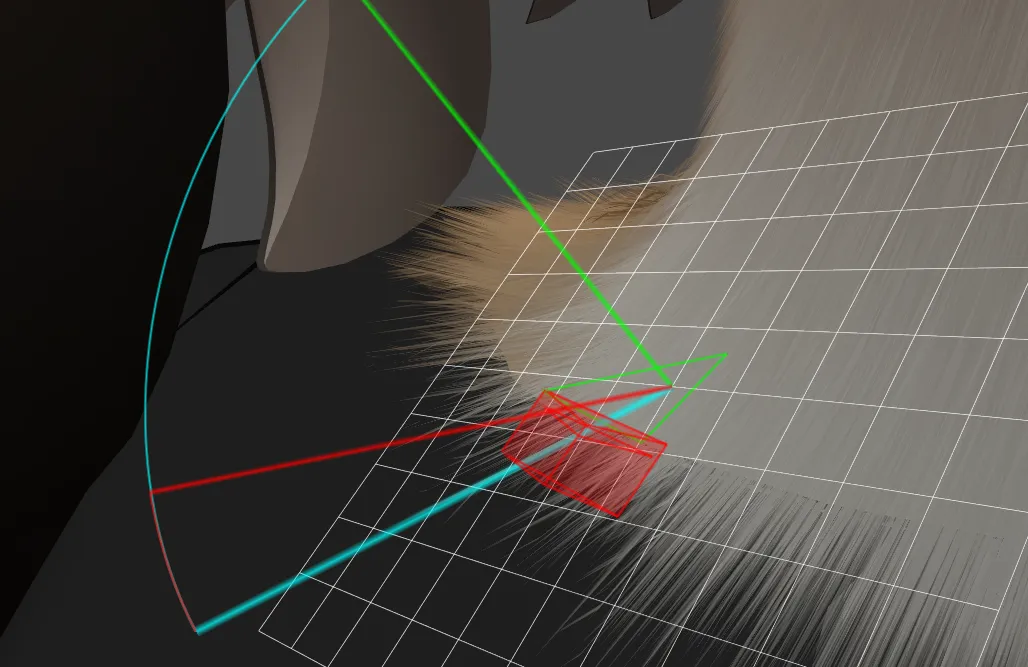
- Green triangle: Skin mesh
- Green line: Line perpendicular to the skin mesh
- Light blue line: Original hair direction and length
- Red solid: Area synthesized with collision detection margin on clothing mesh
- Red line: Resulting direction and length after avoiding collision
Parameters
Section titled “Parameters”You can control Mofufuku’s behavior with the following parameters.
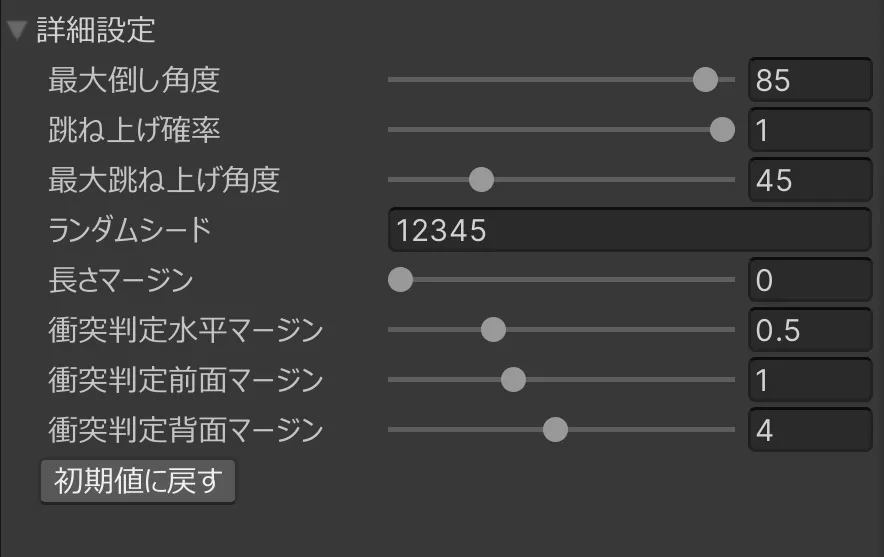
Operation: Calculates the positional relationship between hair and polygons, and resolves collisions in this order: Tilt Up → Lay Down → Shorten Length. (Tilt Up is probabilistic.)
- If you only want to avoid collisions, set Horizontal Margin to 0.5, then increase Front Margin and Back Margin by 0.5 each.
- If hair rising is too intense, reduce Max Tilt Up Angle.
- If you want it to lay down but it shortens, reduce Back Margin.
- If hair disappears near clothing edges, some margin is too large or lay down/Tilt Up angles are too small. Check hit status by clicking that location in Debug Mode.
- If it doesn’t penetrate in the editor but does when moving the body, increase Length Margin.
| Item | Description |
|---|---|
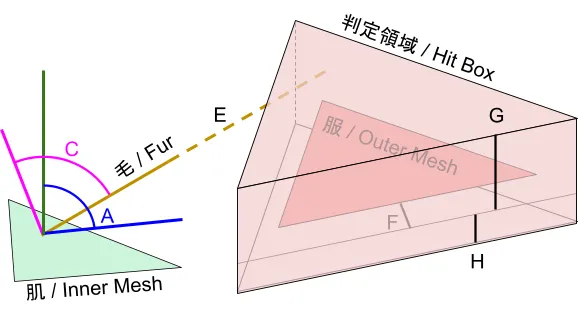
| A. Max Tilt Angle | Maximum angle to tilt hairs to avoid colliding with clothing.\n[Value] 0 - 90 (angle from vertical) |
| B. Tilt Up Ratio | Probability to tilt hairs up to avoid collision. If not selected or still collides, they’ll be tilted down.\n[Value] 0.0 - 1.0 |
| C. Max Tilt Up Angle | Maximum angle to tilt hairs up.\n[Value] 0 - 180 (angle from current direction) |
| D. Random Seed | Random seed for tilt-up lottery. 0: different each run; otherwise fixed. |
| E. Length Margin | Add margin to length for collision detection. Helps prevent collisions when bones are rotated.\n[Value] >= 0 (mm) |
| F. Horizontal Margin | Expand polygons during collision checks to make hits more likely. Prevents misdetections in very small polygons.\n[Value] >= 0 (mm) |
| G. Front Margin | Extend polygon forward along surface normal to make hits more likely. Helps prevent collisions at clothing edges.\n[Value] >= 0 (mm) |
| H. Back Margin | Extend polygon backward along surface normal to make hits more likely. Helps prevent collisions where skin and clothing are parallel, like inside pants.\n[Value] >= 0 (mm) |